Your GitHub, at a glance.
Daily SVG cards of your profile and your repositories, for every README you own. A GitHub Action draws them in your own repository: no server, no third-party service, no dependencies.
- MIT licensed
- Nine looks
- On the GitHub Marketplace
The cards
A dashboard for every repository
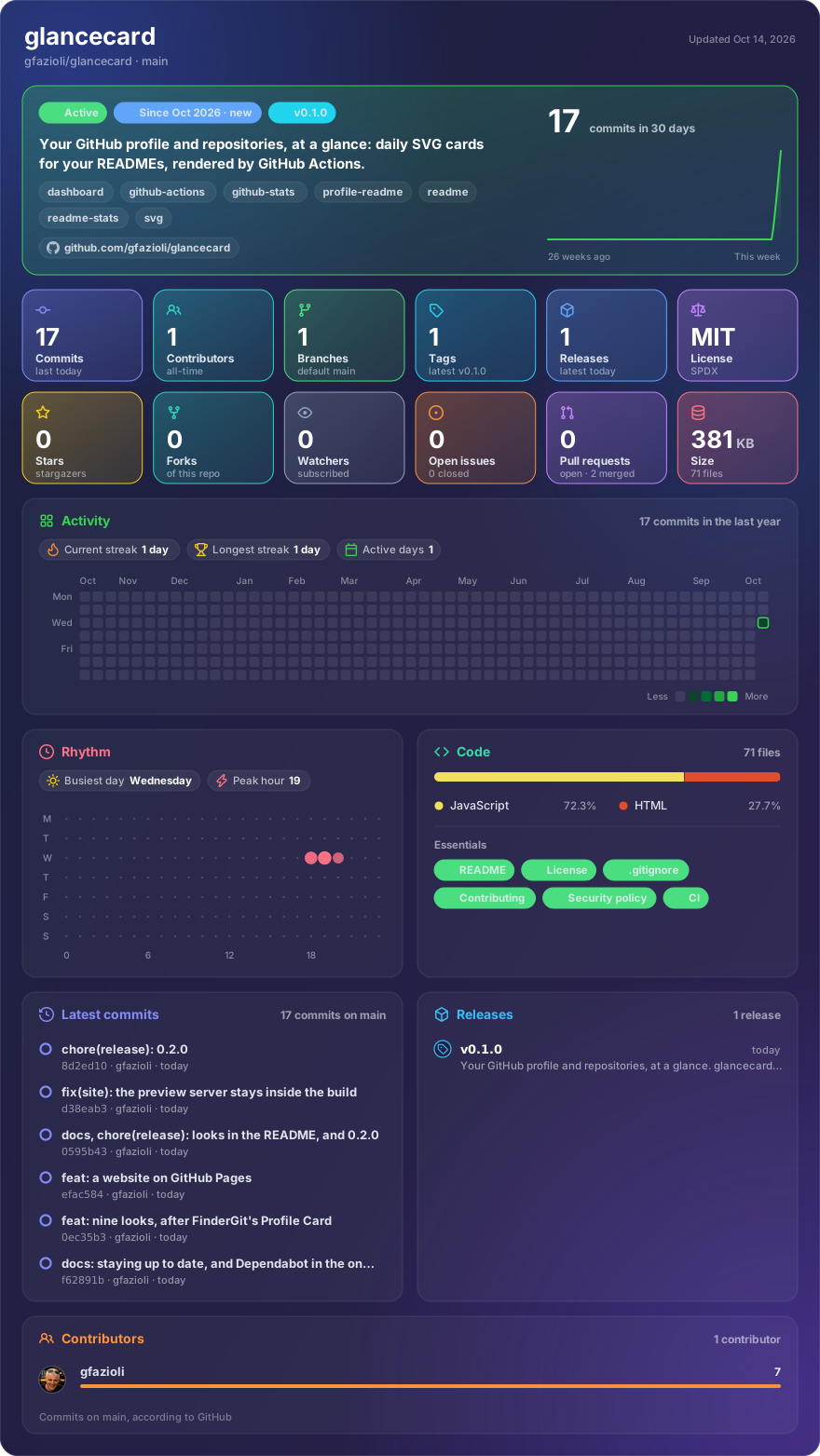
Name a repository and its README gets the whole picture, redrawn every morning.
- Status at a glance: active or quiet, age, latest tag, and the last 30 days with a 26-week sparkline.
- Twelve tiles: commits, contributors, branches, tags, releases, downloads, stars, forks, watchers, issues, pull requests and size.
- A year of commits with streaks, and the week's rhythm by day and hour.
- Every star since day one, as a line that only climbs, with the last 30 days and the best week.
- Languages and essentials: README, license, contributing guide, security policy, CI.
- The latest commits and releases, with their cadence, and who contributed.
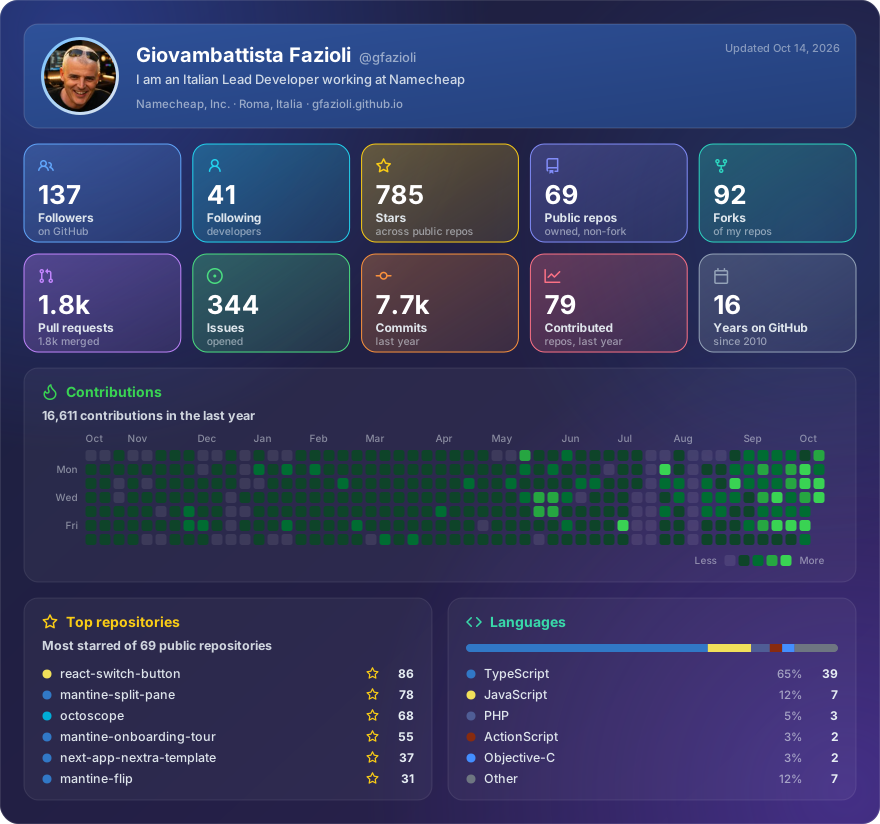
And one for you. The profile card shows your followers, stars, pull requests, issues and commits, a year of contributions as a chart or as GitHub's calendar, every star your public repositories ever got, your most starred repositories and their languages.
Make it yours
Nine looks, and the year and the stars your way
Pick a look, how the year and the stars are drawn, what the repository card shows, and when the cards refresh. The card is drawn right here, by glancecard itself, from the author's data, and the workflow under it is the one to copy.
Several looks in one run work too: list them in theme:, comma-separated, such as theme: both, halloween.
# .github/workflows/glancecard.yml
name: glancecard

on:
  schedule:
    - cron: "30 5 * * *" # every day
  workflow_dispatch:

permissions:
  contents: write

jobs:
  cards:
    runs-on: ubuntu-latest
    timeout-minutes: 10
    steps:
      - uses: actions/checkout@v7
      - uses: gfazioli/glancecard@v0.6.1
        with:
          profile: your-login
          repos: |
            your-login/your-repo
            your-login/another-repo
<picture>
  <source media="(prefers-color-scheme: dark)" srcset="glancecard/your-repo-dark.svg">
  <img src="glancecard/your-repo-light.svg" width="880" alt="your-repo at a glance">
</picture>
The one-paste prompt further down follows your choices too.
How it works
Three steps, once
Your profile repository is a good home for the cards: its README is the first one people see, and every other README can show a card from there.
Add the workflow
One file in .github/workflows/, naming your login and your repositories.
- uses: gfazioli/glancecard@v0.6.1
  with:
    profile: your-login
    repos: |
      your-login/your-repo
theme: bothRun it once
From the Actions tab, or wait for the morning. It commits the cards to glancecard/, then refreshes them every day.
glancecard/profile-dark.svg
glancecard/profile-light.svg
glancecard/your-repo-dark.svg
glancecard/your-repo-light.svgShow the cards
A <picture> in any README, so the card follows the reader's theme.
<picture>
  <source media="(prefers-color-scheme: dark)"
    srcset="glancecard/your-repo-dark.svg">
  <img src="glancecard/your-repo-light.svg"
    width="880" alt="your-repo at a glance">
</picture>
The quickest way
Or set it up in one paste
Paste this into Claude Code, Codex or any coding agent that can run a shell. With the GitHub CLI signed in, it does the three steps for you, adds Dependabot to keep the action current, and shows you every change before it pushes. It follows the choices you made above.
Set up glancecard for me (https://github.com/gfazioli/glancecard): it renders SVG cards of my GitHub profile and of my repositories once a day, with a GitHub Action, for my READMEs.

Repositories that get a card: <owner/name, owner/name — or leave this line as it is, and pick my 3 most-starred public repositories that are not forks>

Use the gh CLI; if it is missing or not signed in, stop and tell me how to fix it. Show me every diff and wait for my OK before each push.

1. Find my login with `gh api user --jq .login`. The cards will live in my profile repository, <login>/<login>: clone it into a temporary folder and note its default branch. If it does not exist, stop and ask me before creating it.

2. Add .github/workflows/glancecard.yml with exactly this content, filling in my login, the repositories (one per line) and this machine's IANA time zone:

   name: glancecard
   on:
     schedule:
       - cron: "30 5 * * *"
     workflow_dispatch:
   permissions:
     contents: write
   jobs:
     cards:
       runs-on: ubuntu-latest
       timeout-minutes: 10
       steps:
         - uses: actions/checkout@v7
         - uses: gfazioli/glancecard@v0.6.1
           with:
             profile: <login>
             repos: |
               <owner/name>
             time-zone: <zone>

   Then make sure .github/dependabot.yml keeps the action up to date: if the file is missing, create it with exactly this; if it exists, add the github-actions entry to its updates:

   version: 2
   updates:
     - package-ecosystem: github-actions
       directory: /
       schedule:
         interval: weekly

   Commit both as "ci: render glancecard cards" and push.

3. Run it once with `gh workflow run glancecard.yml -R <login>/<login>`, follow it with `gh run watch`, and check that glancecard/profile-dark.svg is now on the default branch. If the run fails, show me its log and stop.

4. Add my profile card to my profile README where it fits best (ask me if unsure), then commit and push:

   <picture>
     <source media="(prefers-color-scheme: dark)" srcset="glancecard/profile-dark.svg">
     <img src="glancecard/profile-light.svg" width="880" alt="<login>'s GitHub activity">
   </picture>

5. For each repository above, open a pull request that adds its card right under the README's title, with the same <picture> pointing at https://raw.githubusercontent.com/<login>/<login>/<default branch>/glancecard/<name>-dark.svg and -light.svg. Don't merge them: give me their links.

Change nothing else, and add no tokens or secrets: the workflow uses the token GitHub Actions already provides.
Why glancecard
Yours, and nothing in between
No server
Nothing to host, and no third-party service that can go down or start charging: the cards are files in your repository.
No dependencies
Plain Node with nothing to install, and every action in its CI pinned to a commit.
Public by default
With the workflow's own token a card shows what anyone can see. Private repositories are refused unless you ask.
Never a surprise
Your workflow runs the version it names. A new release reaches you as a Dependabot pull request you read and merge.
Questions
Good to know
Why does it commit to my repository?
A README image has to be a file somewhere. Committing it keeps everything inside GitHub, with no service to trust or keep alive. Commits pushed with the workflow's token start no other workflow, and they keep a public repository active, which stops GitHub from disabling its schedule after 60 quiet days.
How fresh is a card?
As fresh as your schedule: once a day by default. GitHub caches a raw file for about five minutes, and scheduled runs often start a little late.
Can a card show a private repository?
Only if you ask. glancecard refuses private repositories unless you set allow-private: true, because their card would publish their activity wherever it is committed. The profile card counts public repositories only.
What happens when glancecard is updated?
Nothing, until you say so. Your workflow keeps running the version its uses: line names; with Dependabot, a new release becomes a pull request that moves it, and the next run draws with the new version.
Why do the commit days look a few hours off?
GitHub returns commit times in UTC and drops the author's offset. Set time-zone to yours, such as Europe/Rome, and the calendar and the rhythm are read there.
Free, and MIT-licensed
glancecard is made by one developer, in the open. If it has been useful to you or your team, please consider becoming a sponsor, or buying me a coffee: it keeps the project maintained, and the looks coming.
New releases are announced on the Undolog Discord: come and ask, or suggest the next look.