Guide
Getting started
octoscope is a terminal dashboard for your GitHub account — profile, repositories, PRs, issues and CI status, auto-refreshing, without ever leaving your shell.
Install
octoscope runs on macOS, Linux and Windows. Every release carries an archive for each, on the latest release’s page — or take it from the Download button on the home page, which picks the one for your machine:
- macOS — Apple silicon (
arm64) and Intel (x86_64), as.tar.gz. - Linux —
arm64andx86_64, as.tar.gz. - Windows —
x86_64, as.zip.
Each archive holds the binary with the README and the licence: put octoscope (octoscope.exe on Windows) somewhere on your PATH and run it from a terminal. A package manager keeps it current for you, which is why the recommended path, on macOS and Linux, is Homebrew:
$ brew install gfazioli/tap/octoscope
Since v0.34.0 the tap ships a cask rather than a formula: the command above is unchanged and now serves Linux Homebrew as well as macOS. Installed before that? The one-time move is brew uninstall octoscope, then brew install --cask gfazioli/tap/octoscope.
Installed 0.34.0 and the command does nothing? That release's cask put down a binary macOS refused to launch: a cask's download is quarantined where a formula's is not, and Gatekeeper will not run an ad-hoc-signed binary under quarantine — it was killed at startup and the file removed, so octoscope printed nothing and exited 137. brew upgrade --cask gfazioli/tap/octoscope fixes it.
Since v0.34.3 the macOS builds are signed with a Developer ID certificate and notarized by Apple, so a binary downloaded from the Releases page runs without Gatekeeper refusing it — earlier ones carried only Go's own ad-hoc signature, which macOS refuses to run once the file has been flagged com.apple.quarantine — what a browser download does, and what the Homebrew cask works around by clearing the flag. A notarization ticket cannot be embedded in a bare executable, so macOS checks it online the first time you run it: that one run needs a network connection.
Or build from source with a Go 1.26+ toolchain — go install github.com/gfazioli/octoscope@latest.
Since v0.31.0 there are two more ways in. From inside the GitHub CLI:
$ gh extension install gfazioli/gh-octoscope
$ gh octoscope
The same binary from the same release. It sits under a second repository name only because gh takes an extension's name from the repository and refuses anything not prefixed gh- — everything else, issues included, stays in the main repository.
And a container, which is for the scriptable output rather than the dashboard — a TUI inside a container has nothing attached to read it:
$ docker run --rm -e GITHUB_TOKEN ghcr.io/gfazioli/octoscope:latest --plain
Multi-architecture, around 7 MB, and it runs as an unprivileged user. Every release also carries the bare executables beside the archives — octoscope_<version>_<os>-<arch> — for a curl where unpacking is the awkward part.
Run it
With no arguments octoscope opens on your own authenticated account. Pass a username to inspect anyone's public profile:
$ octoscope                 # your account
$ octoscope torvalds        # anyone's public profile
$ octoscope --public-only   # hide private repos / PRs / issues
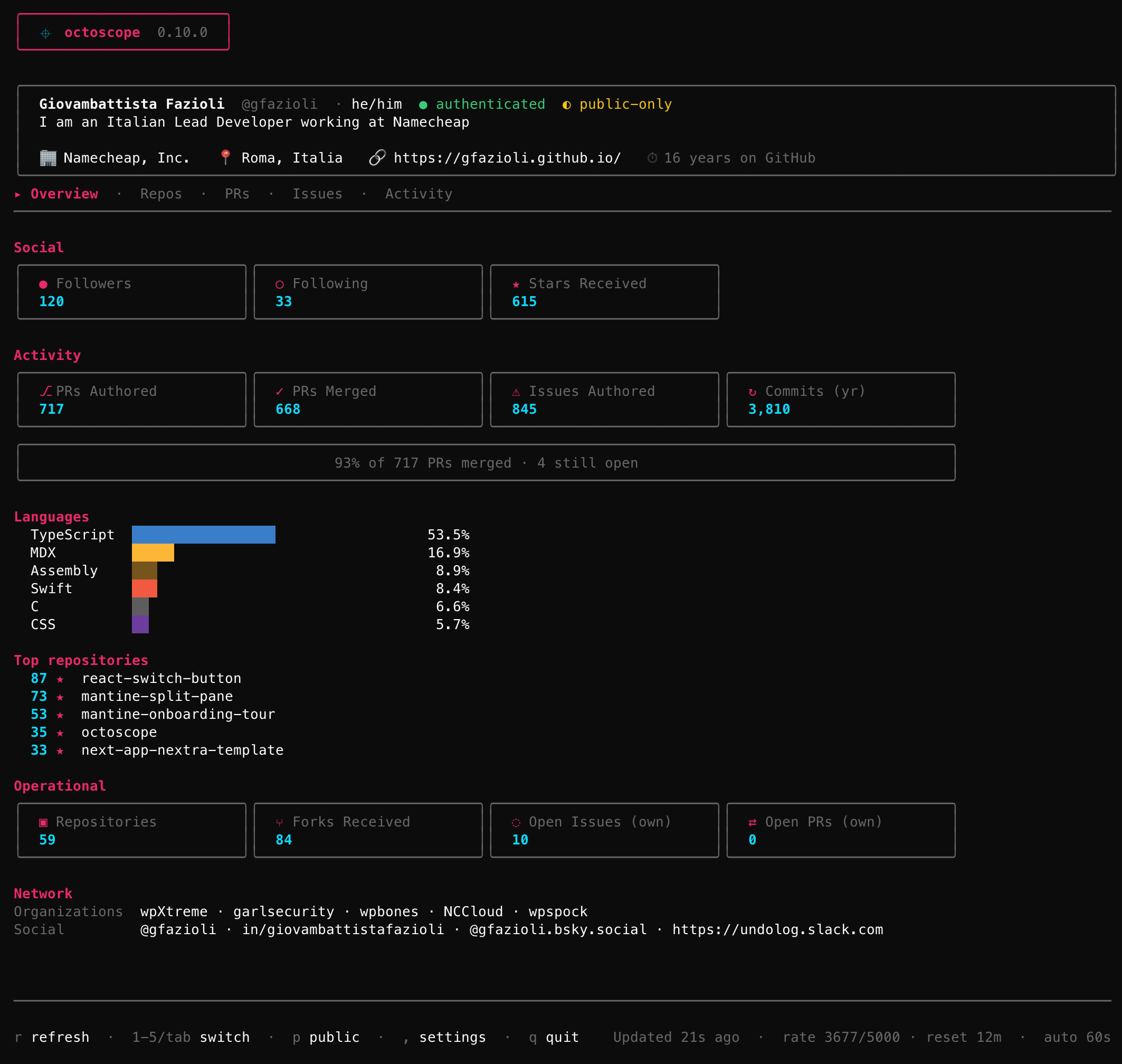
Six tabs, one keystroke away
Everything lives behind the number keys — no menus to hunt through:
- 1 Overview — the dashboard above.
- 2 Repos — every repository with its CI health, stars and last release.
- 3 PRs and 4 Issues — what you've opened, plus review requests.
- 5 Activity — a 12-month contribution heatmap, and a feed of what you actually did.
- 6 Gists — your gists, with the code in them.
- 7 Inbox — your GitHub notifications, read-only.
- 8 What's new — the running version's highlights, bundled offline.
Press ? at any time for the full in-app keymap, and r to refresh on demand. octoscope also auto-refreshes on an interval you control.
octoscope is strictly read-only — it never creates, edits or closes anything on GitHub. A few things it simply can't show, because the API doesn't expose them: profile Achievements, the PRO badge, and your local timezone.